Every customer conversation in one inbox
Your website's live chat, WhatsApp and Telegram in the same inbox. The AI bot answers what it knows; your team takes over the rest.
- 14 days free
- No credit card required
- Two lines of code to install

Channels
Wherever your customers write from
Agents reply on the same screen with the same tools: canned replies, tags, transfers, whispers.
Website chat
A chat widget in the corner of your site, in your colors. In the visitor's language, full screen on phones.
WhatsApp Business
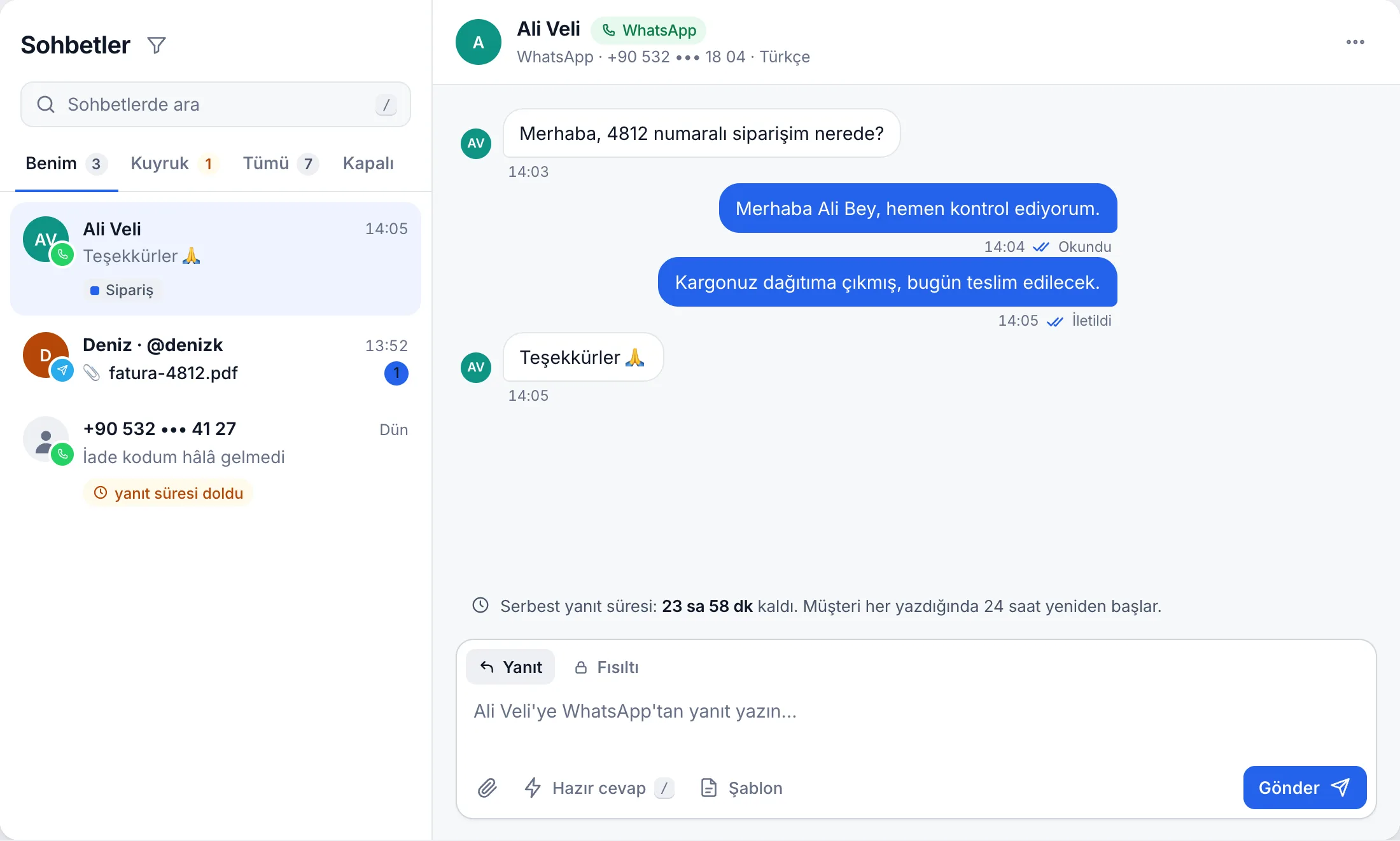
Connects through Meta's official API. The 24-hour reply window counts down on screen; once it closes, you send an approved template.
Telegram
Paste your bot's token and everyone who messages your bot lands in your team's inbox.
Inbox
For teams that reply fast
No leaving the chat to ask a colleague while the customer waits, no retyping the same answer, no rereading the conversation from the top.
See it as they type
You see what the visitor is writing before they hit “send”; your reply is ready before they finish.
Ask with a whisper
Ask a teammate right inside the conversation. Yellow messages never reach the customer.
Reply with one key
Type / and pick a canned reply; the customer's name fills in automatically. Personal, team-wide or per department.
AI bot
Answers what it knows, hands over what it doesn't
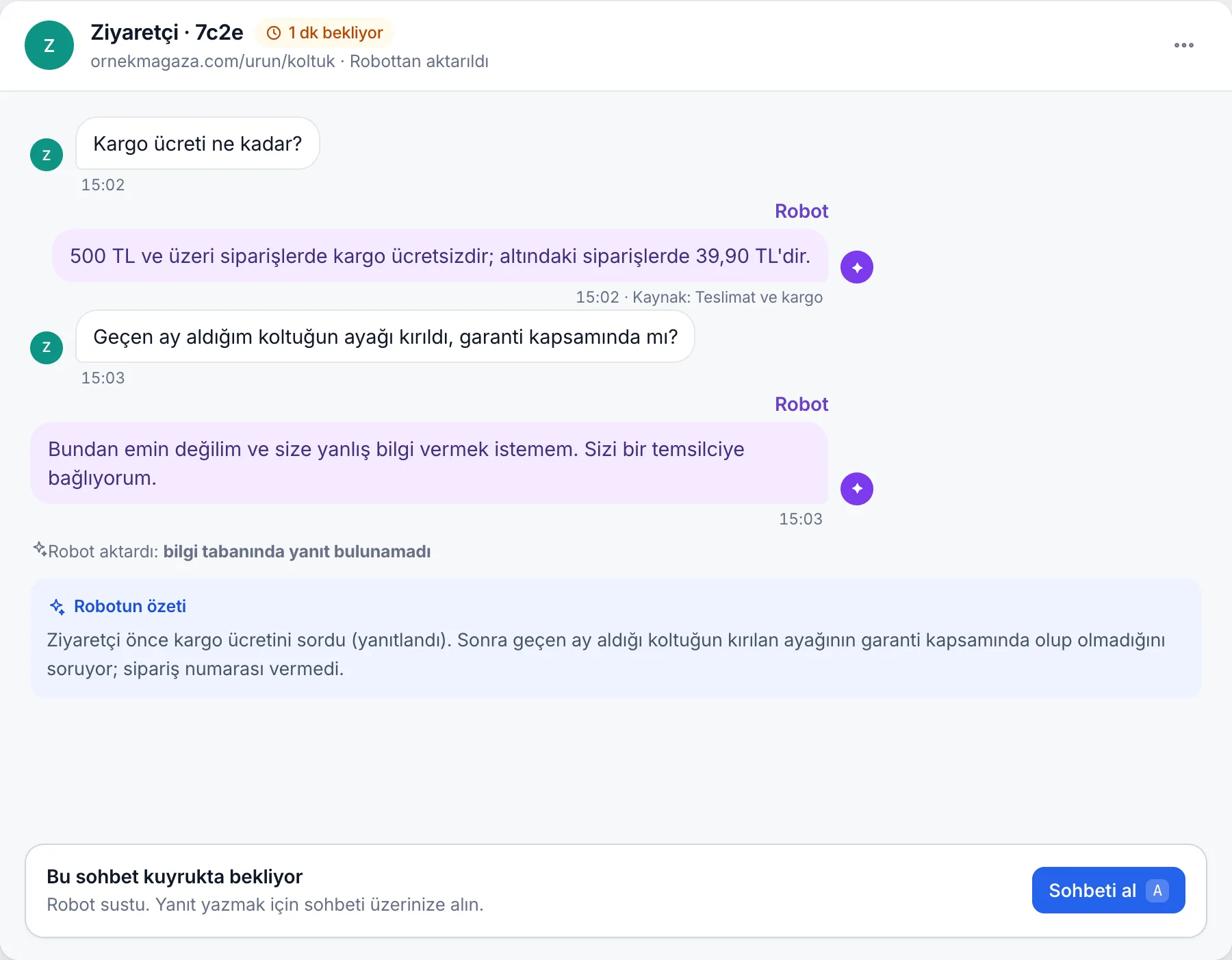
The bot answers from your own knowledge base. If it isn't sure, it doesn't make things up; it hands the conversation to your team with a summary.
- Learns from your documents. Write questions and answers or upload PDF, Word and text files.
- Shows its source. If it can't find a source for an answer, it doesn't send it to the customer.
- You control the spend. It runs on your own Gemini or Claude key; you set the hourly and monthly caps.
Automatic translation
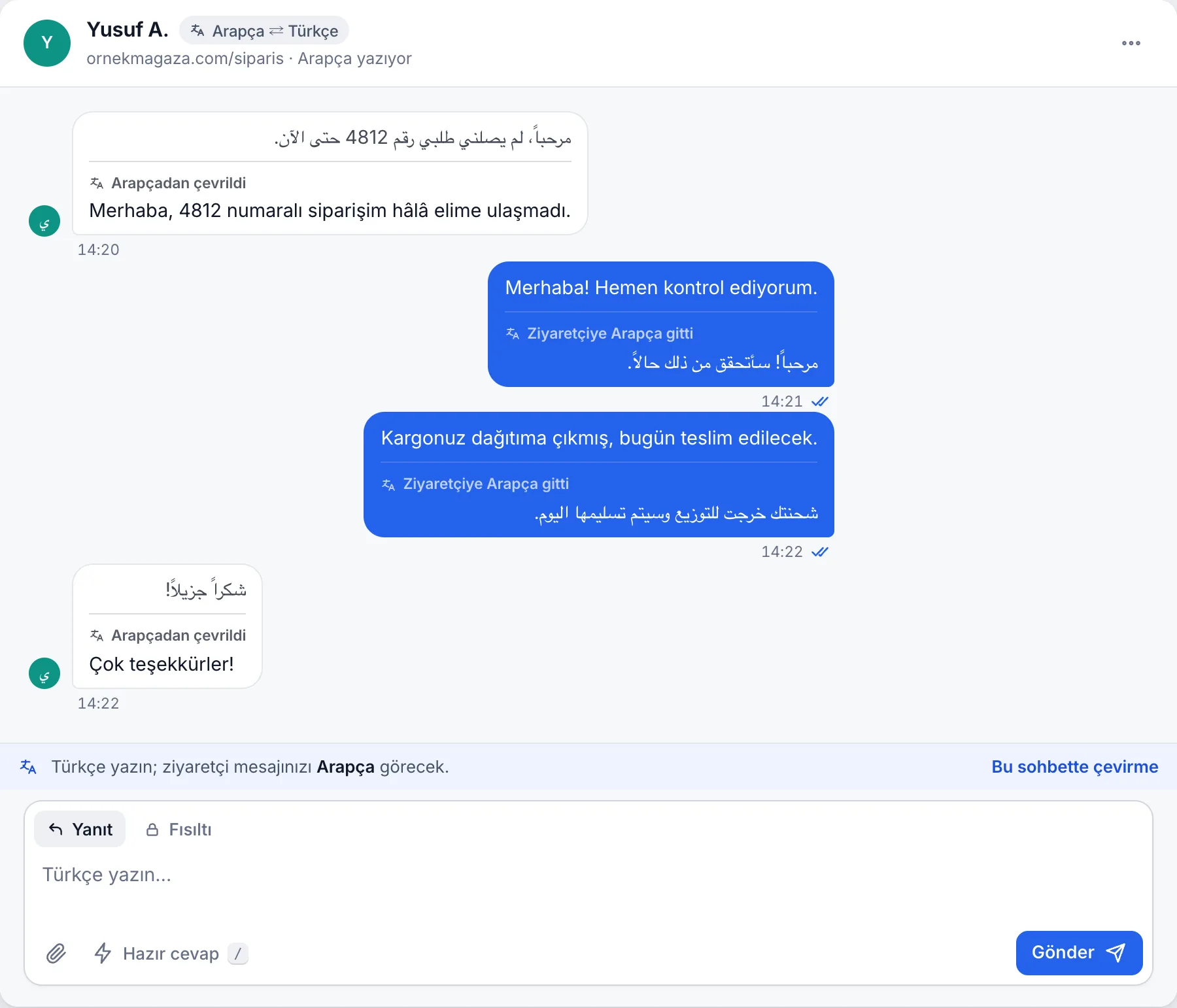
They write in Arabic, you read in English
Messages are translated both ways; the original sits on top, the translation below. All you need to do is connect your DeepL account.
- Detects the language from the text. A visitor whose browser is set to French but who writes in English is treated as English-speaking.
- Nothing wasted. If you speak the same language, the translation service is never called.
- Never holds a message back. If translation is slow, the message goes out as written.
Triggers and question flow
Reach out before they leave
The right message at the right moment for someone lingering at checkout, filling their cart or about to leave.
Question flow with buttons
The visitor moves through the options and types their order number; the conversation lands in the right department, already tagged.
You set the conditions
Page URL, time on page, scroll depth, cart total, device, language, returning visitor.
Separate text for each language
Write your messages in the languages you serve; each visitor sees the one in their own.
Live traffic
Who's on your site right now?
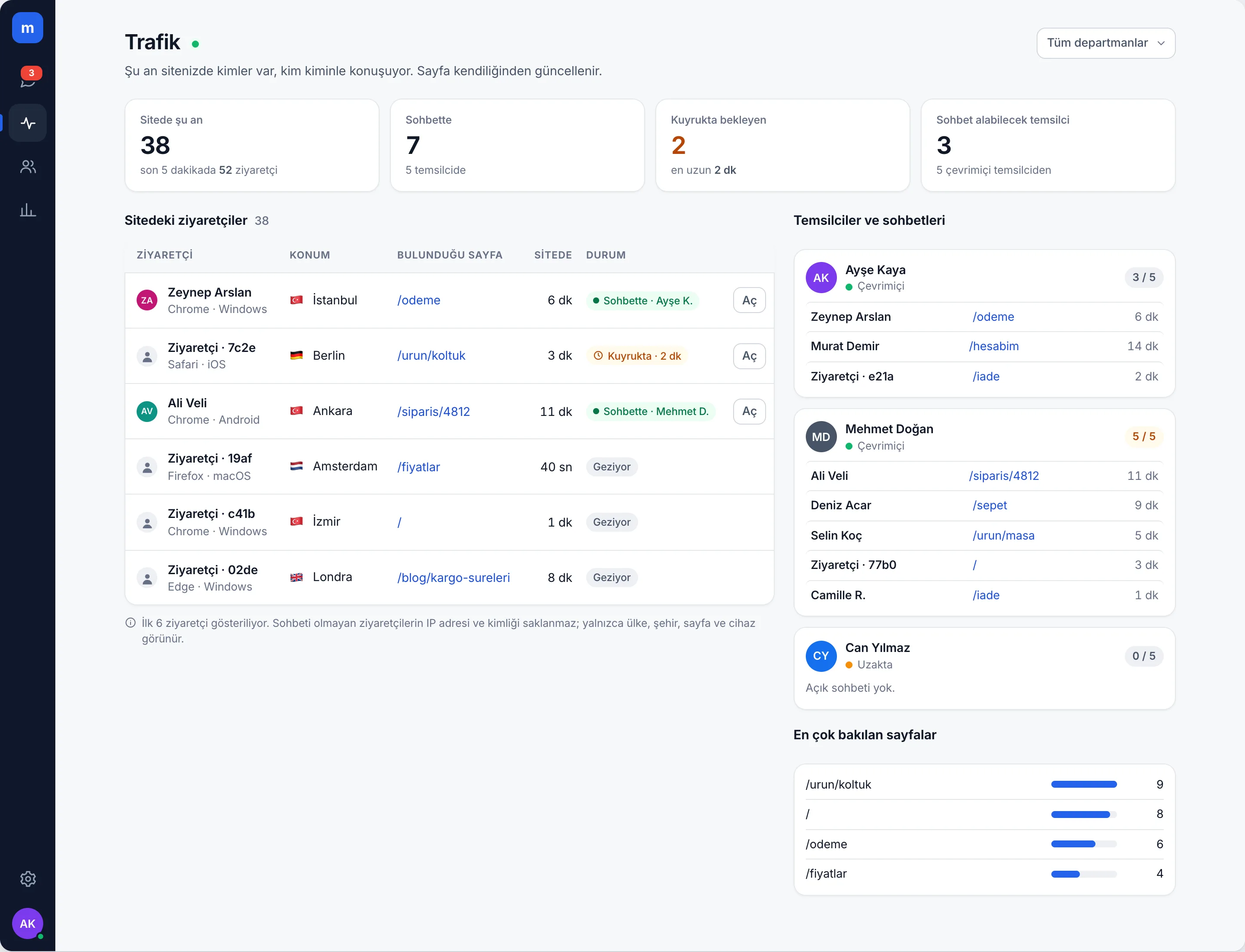
Who is on which page, how many minutes they've been there, who is waiting in the queue; all on one page that refreshes itself.
Know who you're talking to
City, device and the page they're viewing right now sit next to the conversation.
Screen recording, with consent
When a customer says “I'm getting an error”, ask for a recording; if they agree, you see the problem with your own eyes. Anything typed into form fields is always hidden.
Recognize logged-in customers
A user who is logged in to your site shows up as verified in the chat, along with their previous conversations.
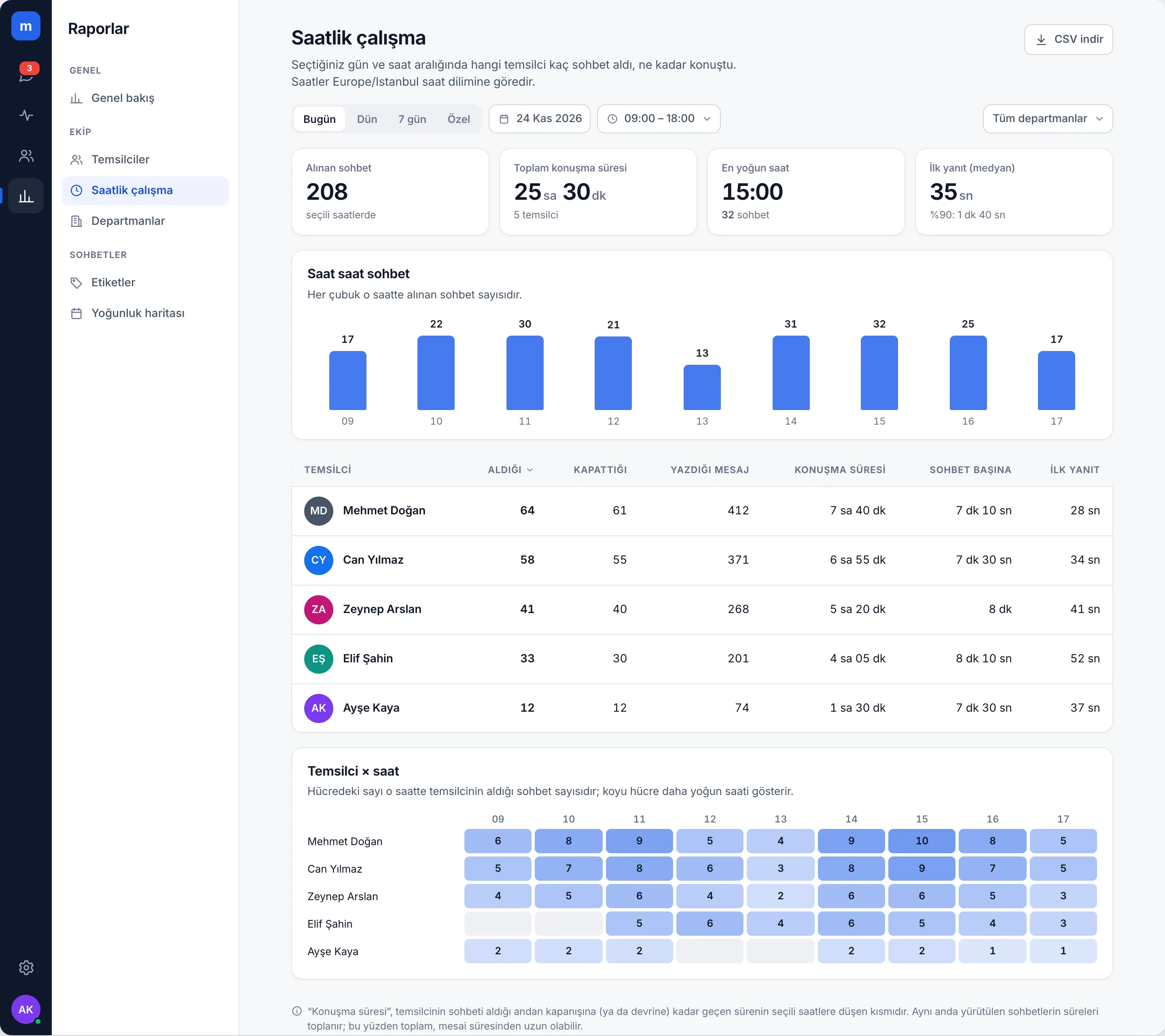
Reports
How many people do you need, and when?
Who handled how many conversations in which hour, and how long customers waited for the first reply. Plan shifts with numbers, not guesses.
- Hourly activity. Conversations taken and closed, messages and talk time per agent.
- First response time and satisfaction. Daily chart, rating breakdown.
- Heatmap and Excel. Day × hour heatmap; CSV in one click.
All in the panel
Everything a support team needs
- Roles and permissions
- Departments
- Automatic routing
- Chat transfer
- Canned replies
- Tags
- Whisper
- File sharing
- Satisfaction rating
- AI reply suggestions
- Chat summary
- Automatic translation
- Question flow
- Triggers
- Screen recording
- Live traffic
- Hourly report
- Webhook
- Actions
- API keys
- Google Analytics
- Auto-close
- Visitor blocking
- Dark theme
- Keyboard shortcuts
Setup
Two lines of code, that's it
- Create an accountVerify your email and invite your team.
- Make the widget your ownTitle, color, welcome text; see it in the preview as you type.
- Paste the code into your siteThe panel gives you the code ready to go, with your key included.
<!-- before the </body> tag -->
<script src="https://…/widget.js" async></script>
<script>
  window.muchat = window.muchat || function () {
    (muchat.q = muchat.q || []).push(arguments)
  };
  muchat("init", { key: "pk_your_key" });
</script>
Privacy and security
Your customers' data stays with you
Security isn't a settings page; it's how the product is built.
IP addresses stay inside
A visitor's location is looked up in a local database on the server; the IP is never sent to any outside service.
No tracking code
The chat widget loads no third-party fonts or tracking code.
Accounts are kept apart
Each account's data is isolated at the database level; one account cannot see another's rows.
Keys are encrypted
Your WhatsApp, DeepL and AI keys are stored encrypted and never shown on any screen again.
Permissions are checked on the server
Four roles, sixteen permissions. Who can see what is checked again on every request.
AI only when you turn it on
It is off by default. No conversation goes to an AI provider unless you turn it on.
Pricing
Try it free for 14 days
No credit card required. Paid plans will be announced soon.
Pricing pageGet your first chat today
Create your account, paste the code into your site and talk to your first visitor.