Plugins
Plugins
Channels, automation, translation and integrations. Each account turns on the plugins it wants and enters its own settings.
How plugins work
- You turn them on and off. In the panel under Settings → Plugins; a plugin that is off does nothing.
- You connect your own account. You pay WhatsApp, DeepL or the AI provider directly for their service.
- Your keys are stored encrypted. Entered once, never shown on any screen again.
Channels
WhatsApp Business
Customers who message your WhatsApp Business number land in your inbox; your reply goes out through WhatsApp.
DetailsTelegram
Customers who message your Telegram bot land in your inbox; your reply goes out through Telegram.
DetailsBring your Instagram DMs into the inbox.
Facebook Messenger
Coming soonBring the messages sent to your Page into the inbox.
Automation
AI bot
Answers from your knowledge base in the visitor's language; hands over to an agent when it doesn't know.
DetailsQuestion flow
Questions with buttons and ready-made answers before connecting to an agent.
DetailsProactive triggers
Shows a message automatically based on the visitor's behavior.
DetailsScreen recording
With the visitor's consent, briefly records the page they are on; the agent sees the problem with their own eyes.
DetailsLanguage
Integrations
Channels
WhatsApp Business
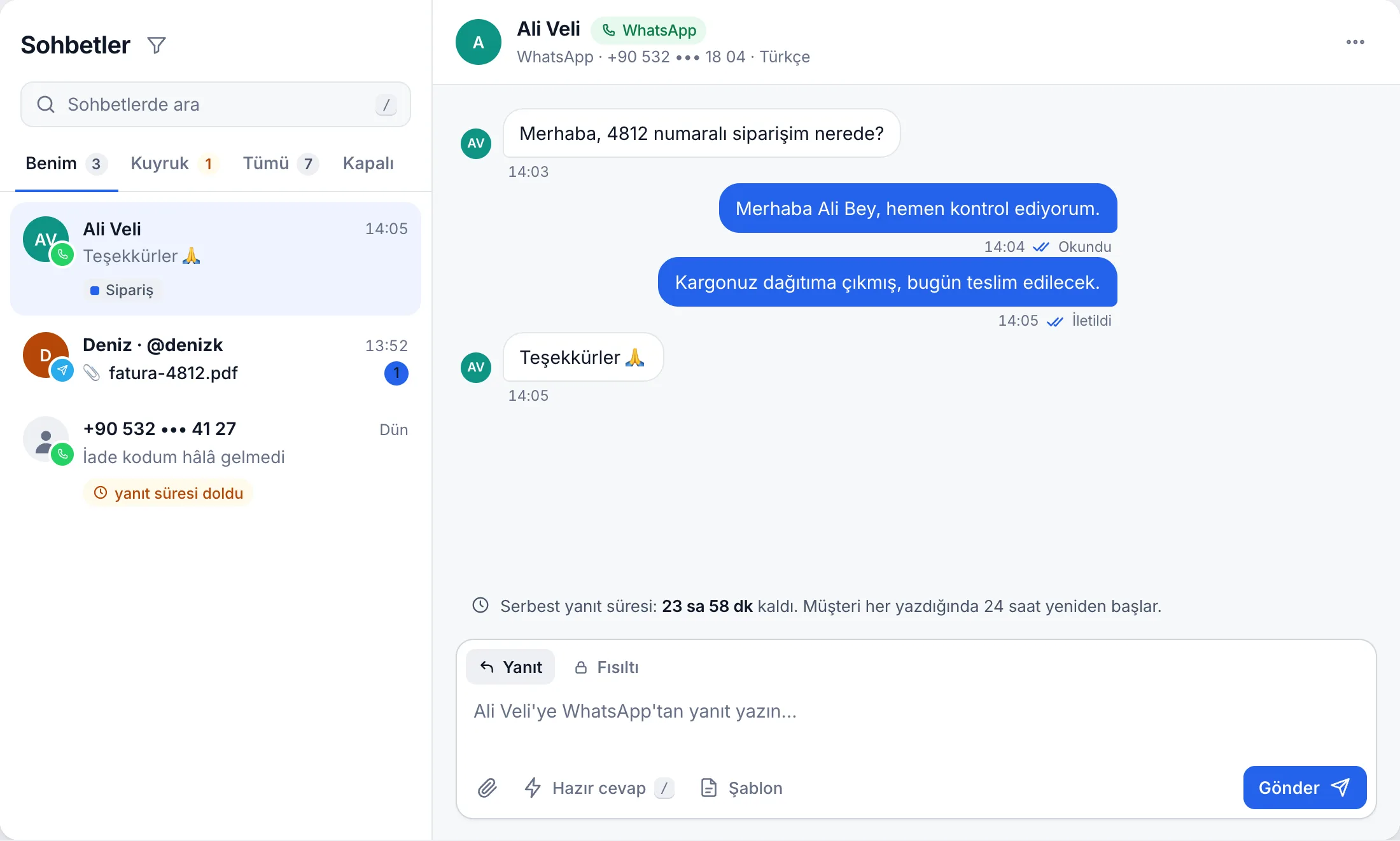
It works with Meta's official Cloud API. The customer messages your number, the conversation lands in the same list as your website chats and is assigned to an agent by the same rules.
- The 24-hour rule, on screen. The free-form reply window counts down below the conversation; once it runs out, you send one of your templates approved by Meta.
- Delivery status. Sent, delivered, read and failed are shown below the message.
- Files and question flow. Documents and photos sent by the customer are added to the conversation; the question flow works on WhatsApp as buttons and lists.
- Number privacy. The phone number appears masked (+90 532 ••• 18 04); only authorized users can reveal the full number, and whoever reveals it is logged.
Channels
Telegram
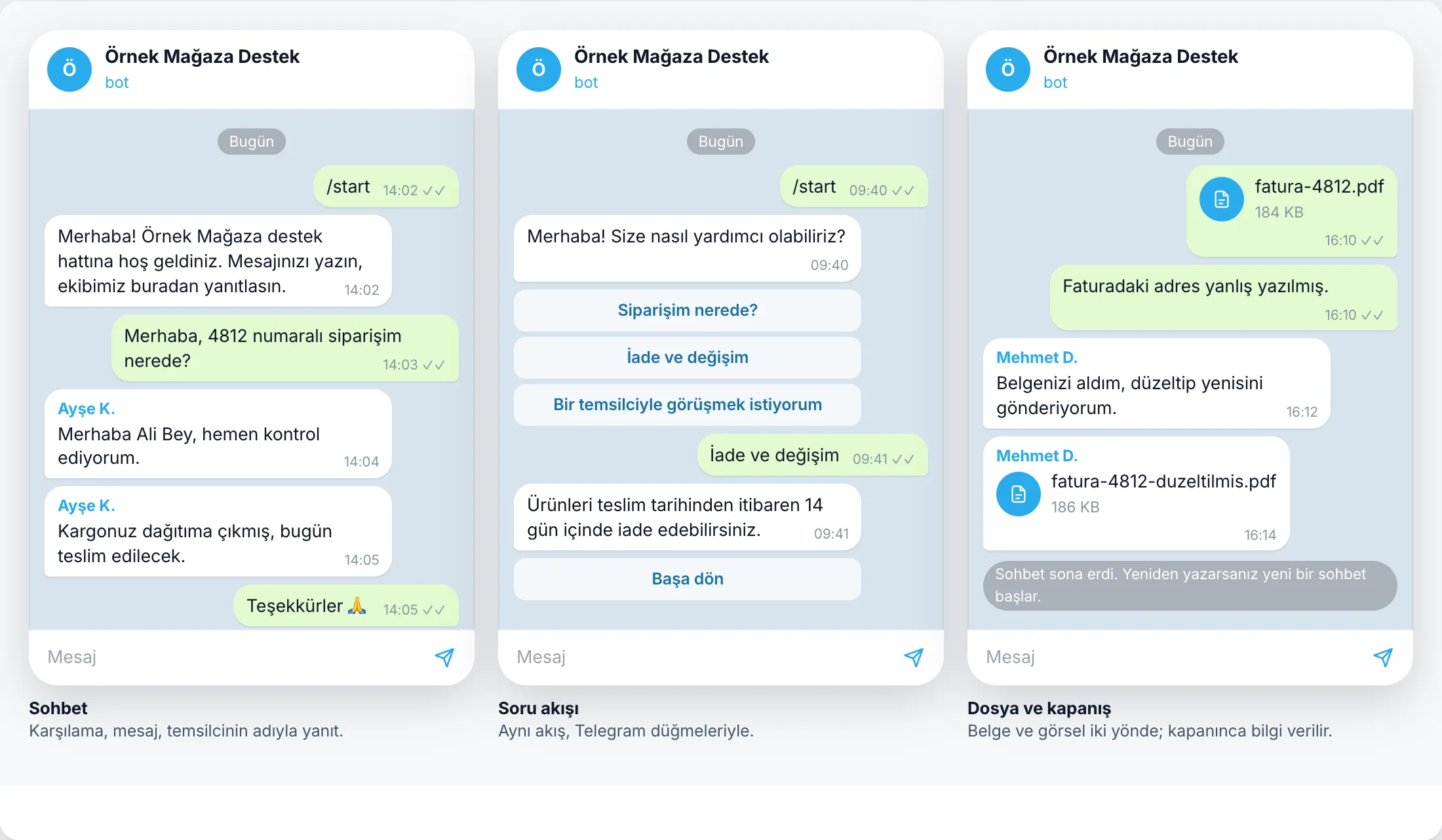
Paste the token you got from BotFather into the panel; MuChat verifies the token and connects the bot itself.
- The same inbox. Telegram conversations are included in departments, tags and reports too.
- Files both ways. Documents and photos sent by the customer are added to the conversation; files you send are uploaded to Telegram.
- Question flow and bot. The question flow works on Telegram with buttons; you can turn on the AI bot separately for this channel.
- Welcome and out-of-hours messages. You write the texts sent to someone messaging the bot for the first time and to someone writing while the team is offline.
Automation
AI bot
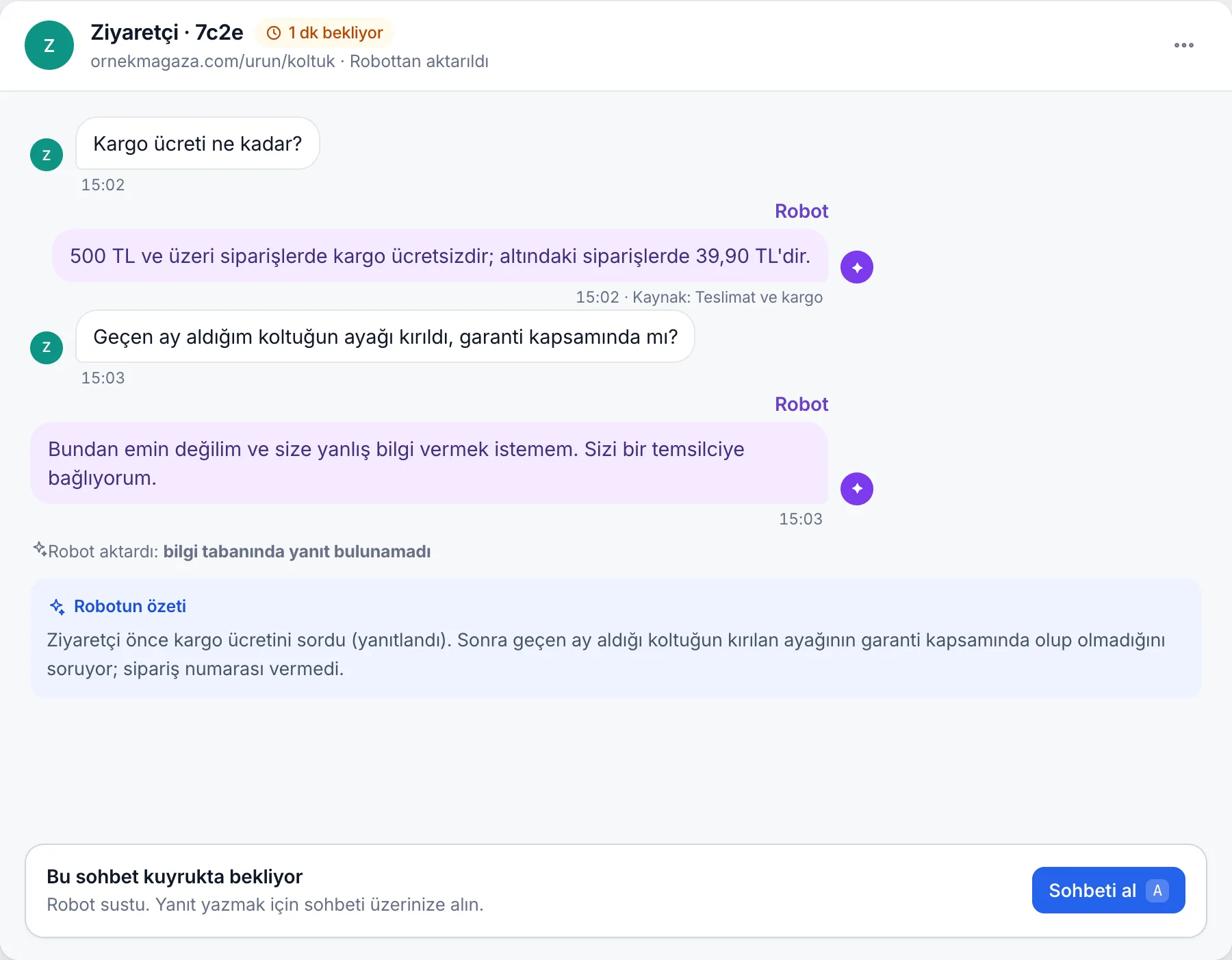
The bot greets new conversations and answers only from the information you have uploaded. It runs on your own Google Gemini or Anthropic Claude key; you choose the model from the list.
- Knowledge base. Write questions and answers or upload documents (PDF, DOCX, TXT, MD, CSV). Questions the bot could not answer are collected in a separate list.
- It doesn't make things up. An answer it cannot back with a source is not sent to the customer; the conversation is handed to an agent together with the bot's summary. The visitor can ask for an agent at any time.
- Spending limits. Replies per conversation, questions per visitor per hour, and hourly and monthly caps for the account. None of them can be left “unlimited”.
- Style and testing. Set the bot's name, tone and reply length; before going live, try it out in the panel with your own questions.
Automation
Question flow
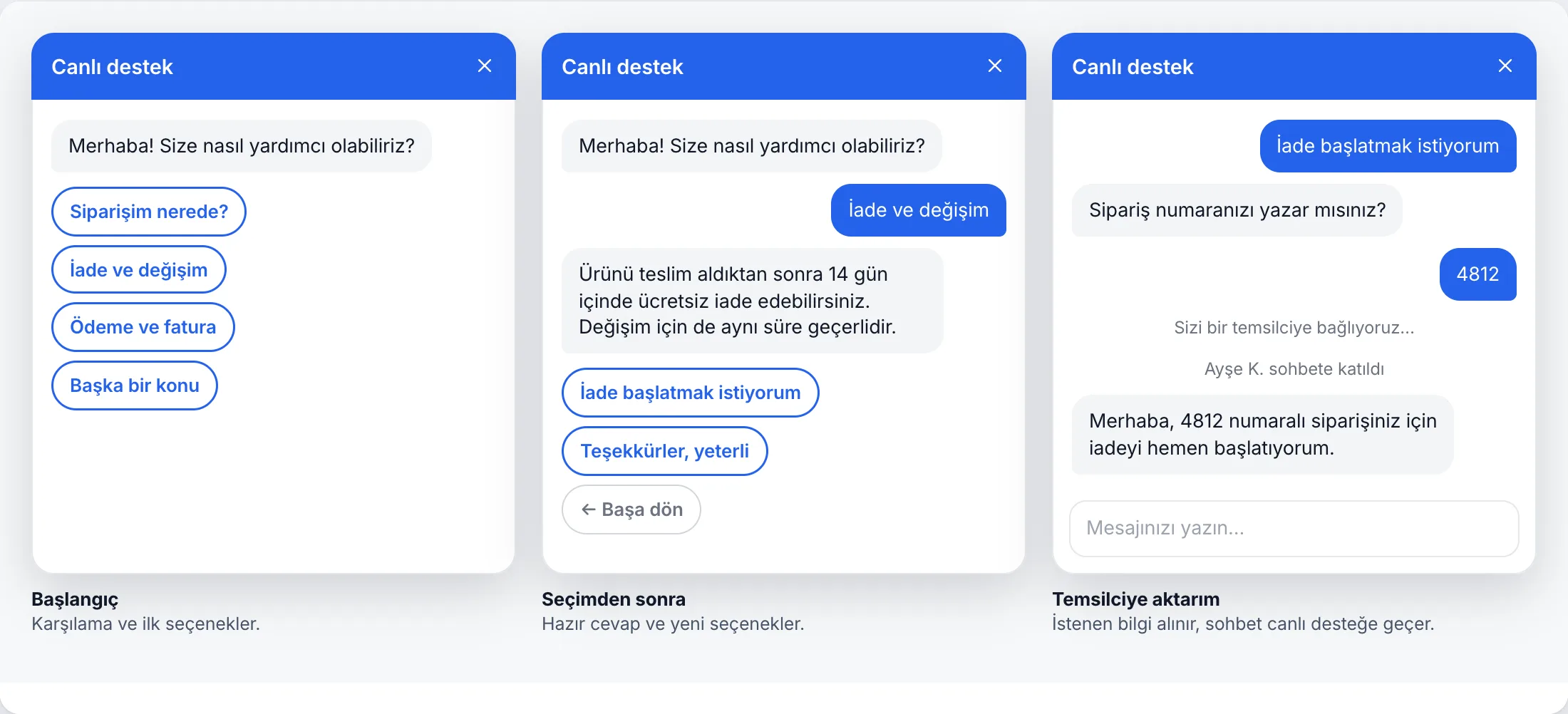
The visitor moves through with buttons, finds the answers to common questions on their own and, if needed, is handed over to the right department.
- Four step types. Message and buttons, ask for information (free text, order number, email, phone), hand over to an agent, finish.
- Right queue, right tag. In the handover step you choose the department the conversation lands in and the tags to add; the agent sees the visitor's choices at the top of the conversation.
- In every language. Write the steps in the languages you serve; missing translations can be filled in with the DeepL plugin.
- Statistics. See how many people got through each step and where they dropped off.
Automation
Proactive triggers
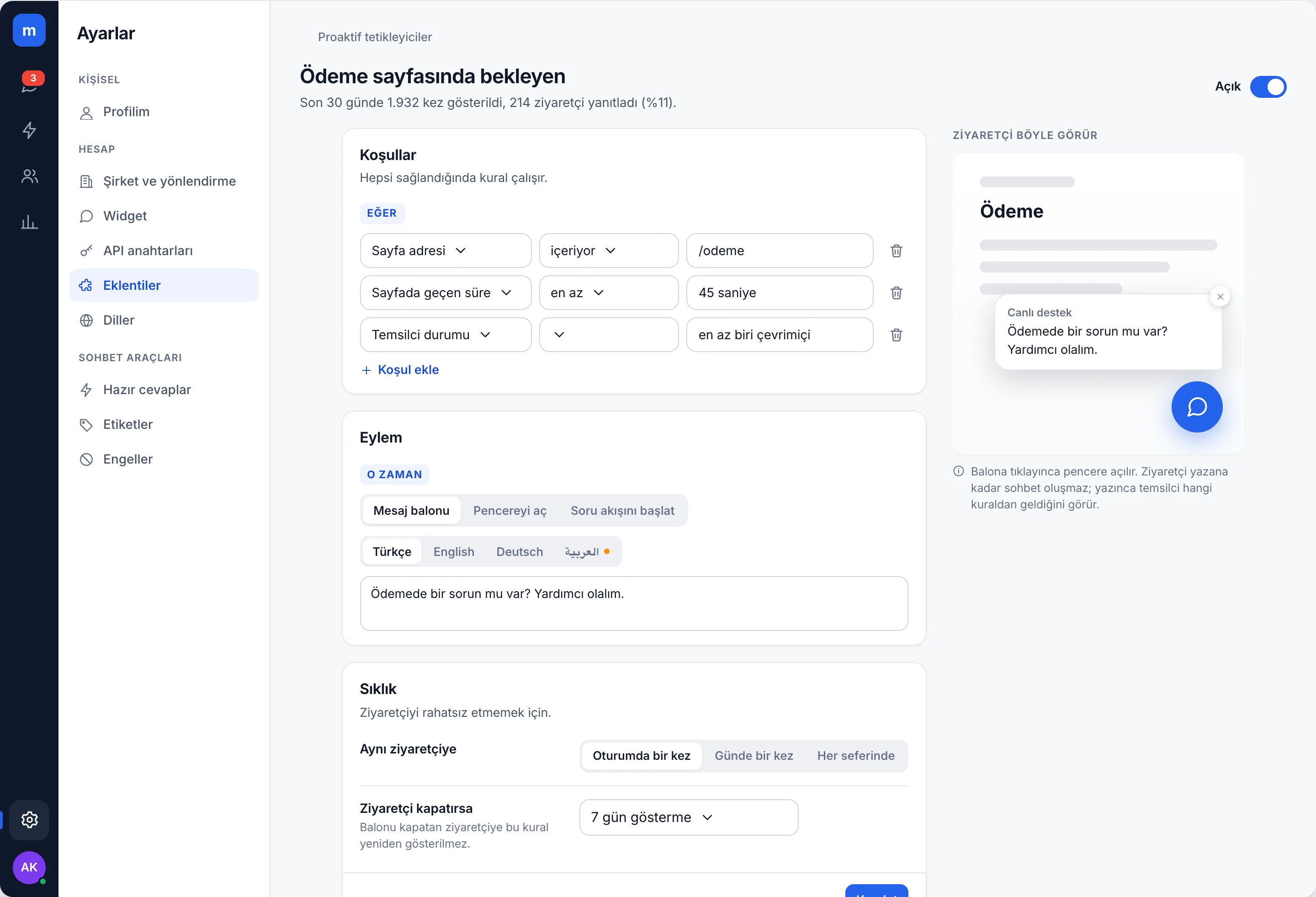
With “if … then” rules you reach the right visitor at the right moment. You can start from ready-made templates: lingering on the checkout page, abandoning the cart, browsing the prices, visiting for the first time.
- Conditions. Page URL, time on page and on site, scroll percentage, number of pages visited, exit intent, returning visitor, device, language, agent status, and the values and events your site reports.
- Action. Shows a message bubble, opens the widget or starts the question flow.
- Not intrusive. Once per session, once per day or on every page; a visitor who closes the bubble is not shown it again for the period you set.
- No chat is opened until the visitor writes. The rules run in the visitor's browser; your queue doesn't fill up with empty messages.
Automation
Screen recording
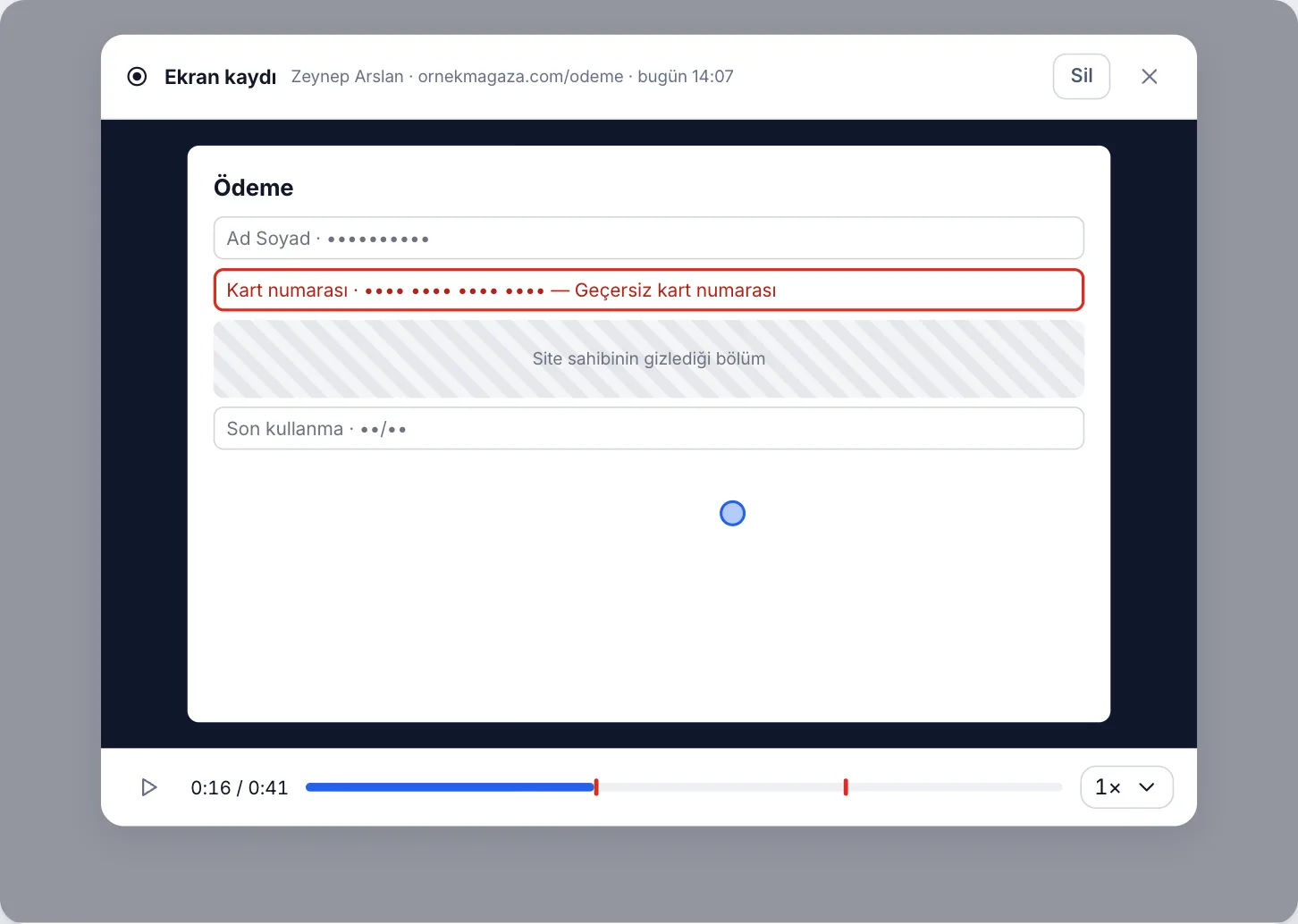
The agent requests a recording and the visitor approves; the page is recorded for at most 30 or 60 seconds, and the recording sits in the conversation as a message.
- Consent is required. Recording does not start until the visitor approves; while it is running, a “Stop recording” bar stays on screen.
- Form fields are always hidden. If you like, you can also hide all text, selected sections and images.
- Retention period. Recordings are deleted automatically after 7, 30 or 90 days.
- Website chat only. The recording plugin is loaded only once the visitor gives permission; it adds no weight to your page.
Language
Automatic translation (DeepL)
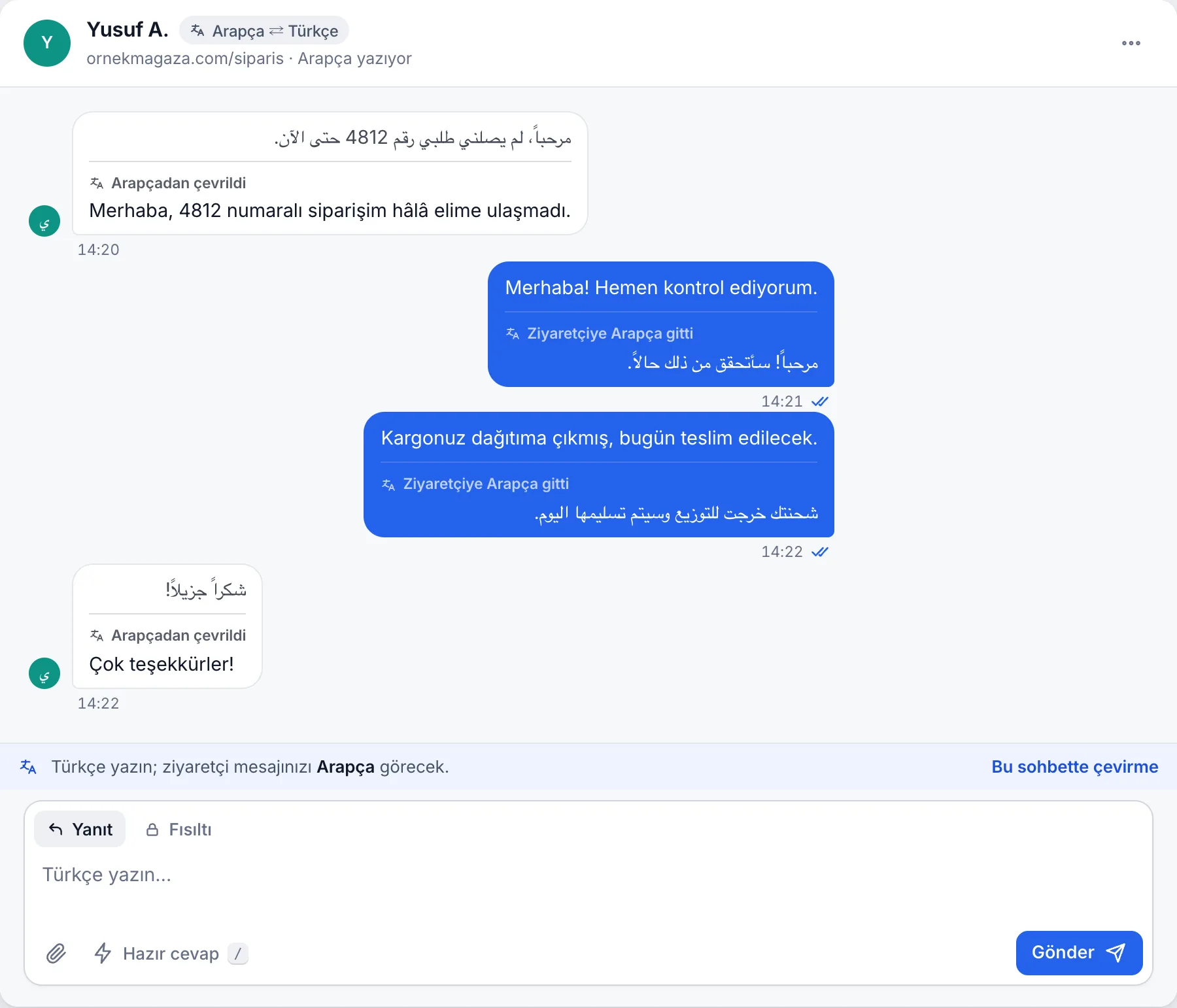
You enter your own DeepL key. The agent sees the customer's message in the original and in translation and writes in their own language; the customer receives the translation.
- Language is detected from the text. The visitor's language is determined from what they write, not from their browser.
- No unnecessary calls. DeepL is not called if the languages are the same, if the message is only a number or an emoji, or if the same short text was just translated. You decide which languages are not translated and set the monthly cap.
- Never blocks a message. If DeepL is slow or your quota runs out, the message goes out as written; the agent sees this in a banner.
- Can be turned off per conversation. An agent can turn translation off for a single conversation. Whispers and files are not sent to DeepL.
Integrations
Webhooks and actions
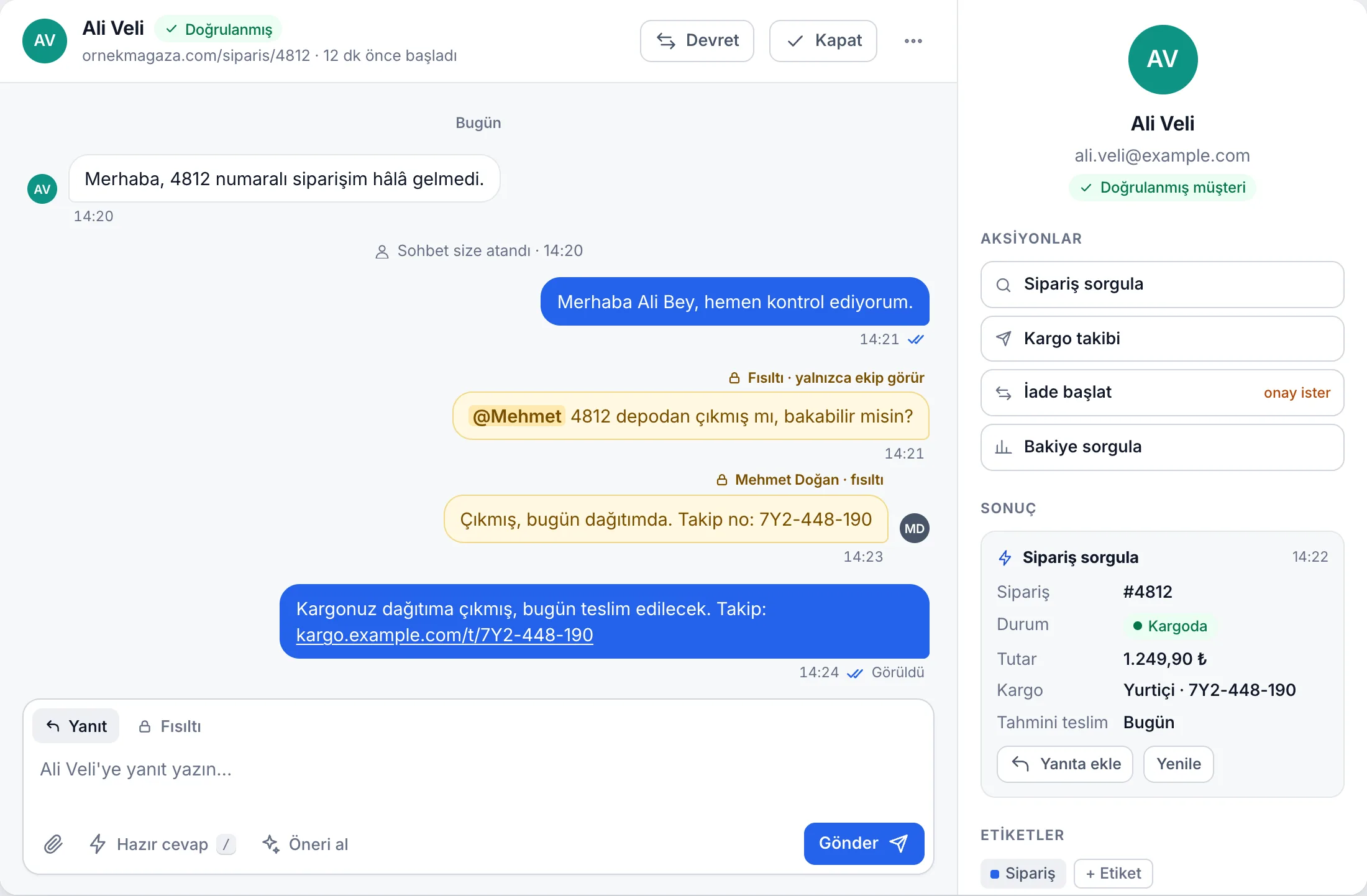
Connects MuChat to your own system in both directions: events are reported to you, and agents perform operations in your system.
- Webhook. Chat started, assigned, closed; visitor or agent message; rating given; question flow completed. Requests are signed (HMAC-SHA256).
- Retries. If your system does not respond, the notification is retried at increasing intervals for about 21 hours; it can also be resent manually from the panel.
- Actions. Define operations such as “look up order” or “start refund”: the fields the agent fills in, the request sent to your system and the fields shown from the response. An operation that changes data requires an extra confirmation.
- Audit log. Who ran which action, when and with which values; kept for 90 days. Your secrets never reach the agent's browser.
Integrations
Google Analytics
Forwards chat events to the Google Analytics or Google Tag Manager already installed on your site.
- Events. Widget opened, chat started, message sent, form filled in, rating given; you choose which ones are sent.
- No extra tracking code. No separate code is loaded and no cookie is set; your site's own consent setting applies.
- No personal data is sent. Message text, name and email are not sent; only the event name and the rating.
- Open to other tools too. You can listen to the same events from your site's code and send them to your own analytics tool.
Get your first chat today
Create your account, paste the code into your site and talk to your first visitor.